
CASE STUDY
9/3/2025Generate Leads with Google Maps Using n8n Automation
Client Name
•Industry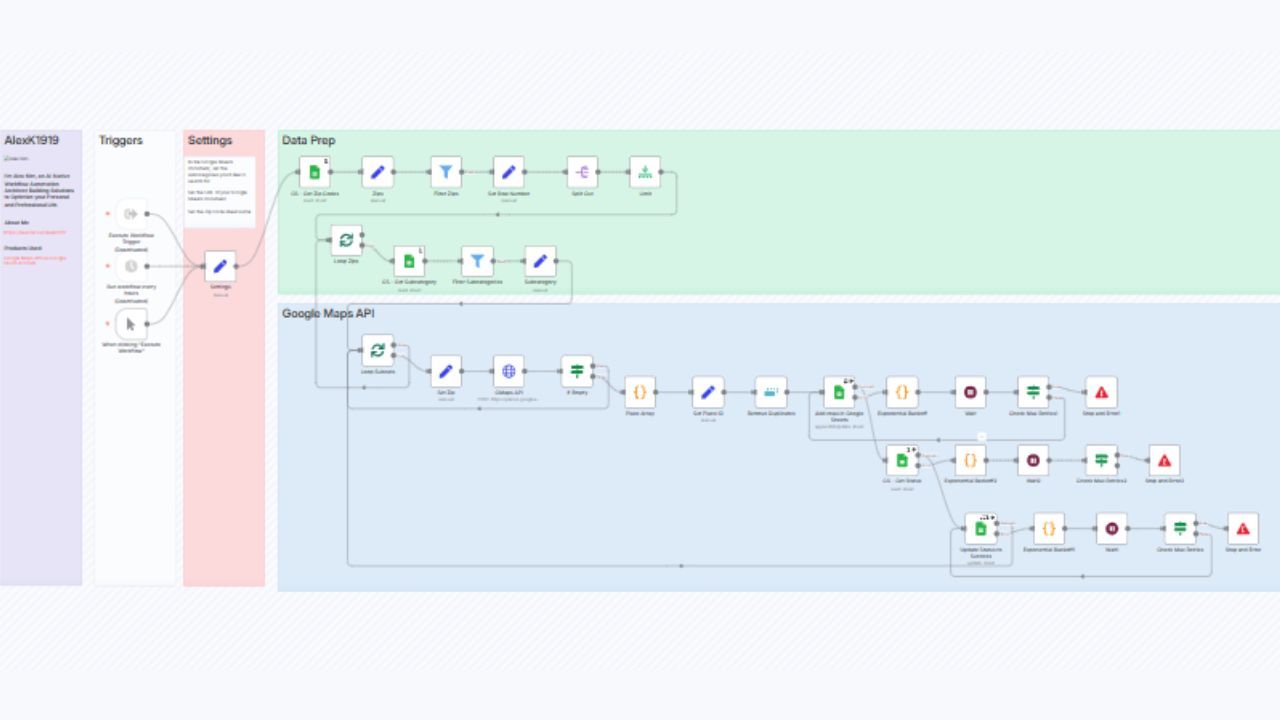
Positive results achieved
Key Results
Client Name
Client
Industry
Industry
In sales and marketing, accurate and timely lead acquisition is critical. Yet traditional lead scraping, manually searching Google Maps, copying business details, and organizing everything in spreadsheets is time consuming and error prone.
This case study explores how the n8n “Generate Leads with Google Maps” template transforms this process into a highly efficient and scalable system. It combines Google Maps API searches with Google Sheets management, using automation to extract location based lead data, filter duplicates, handle errors, and load results into a clean database. The system frees up valuable time and ensures consistency for sales teams exploring local or geographic lead lists.
A mid sized B2B services company faced persistent inefficiencies in lead collection:
Manual Google Maps SearchesTeam members typed in each ZIP code and category, like "dentist in 75001," scrolled through listings, copied business names, addresses, and phone numbers, and pasted them into sheets. This often took 3 - 4 hours per campaign.
Data Quality Issues
Variability in naming conventions, missing fields, duplicates, and inconsistent formatting created follow up challenges for sales reps.
API Rate Limits and Error HandlingWhen the team attempted to use the Google Maps API manually, they ran into rate limits or request failures without a proper retry mechanism.
Lack of Process VisibilityWithout logs or statuses, it was unclear which ZIP codes or categories had been processed or where errors occurred.
These inefficiencies slowed growth, required inefficient manual cleanup up and reduced confidence in data quality, especially important when scaling local outreach across markets.
The project aimed to build a lead generation workflow that would:
Automate the process of querying Google Maps for each combination of ZIP code and category
Gracefully handle API rate limits with retry logic
Filter, deduplicate, and structure business lead data in a consistent format
Log lead status and errors to enable visibility and debugging
Run on demand or on schedule to keep data fresh
Integrate directly into Google Sheets, making it accessible and shareable to non technical team members
The solution leveraged the n8n “Generate Leads with Google Maps” template, creating a workflow that works as follows:
Prepopulate Google Sheets
Create a “ZIP Codes” tab listing geographic areas (like “AZ Zips”)
Create a “Categories” tab containing business types (for example, “Dentist”, “Coffee Shop”)
These sheets act as the driving input for the workflow
Configure Google Maps API Access
Set up a Google Cloud project with Maps (Places Search) and Sheets API access
Store credentials in n8n via OAuth or API key for secure access
n8n Workflow Structure
Trigger node: runs manually or is scheduled
Loop over ZIP codes and categories: generates query combinations
Google Maps API node: uses places.searchText with each query, retrieves business listings
Filter and dedupe nodes: removes duplicates based on business name, address, or place ID
Google Sheets node: appends structured data name, address, phone, website, latitude, and longitude to the designated output sheet
Retry logic and backoff: if API rate limits are hit, the workflow automatically waits and retries
Logging: updates status fields in the input sheet to mark done, failed, or pending, enabling real time tracking
Output Management
Clean, structured business data for each ZIP and category
Status tracking allows the operations team to quickly see which areas or categories need reruns
The entire workflow run is visible in logs and Google Sheets for audit and transparency
After launching this workflow for five weeks, key findings included:
EfficiencyManual lead collection time dropped from 3 4 hours per campaign to under 15 minutes with auto extraction and processing.
Data ConsistencyStructured, deduped output ensured clean records for downstream CRM or outreach tools.
Error TransparencyFailures due to API limits or missing data were visible in Sheets, and retries ensured fewer lost queries.
ScalabilityThe same workflow supported expansion from a single city to 50 ZIP codes across multiple categories without added manual load.
Team ConfidenceThe operations team gained trust in the system once status and logs showed reliable behavior.
One sales leader commented on improved velocity: “We now launch localized outreach within the hour of deciding on the target area, not days later.”
The workflow delivered a strong business impact:
75% Time SavingsHours of manual research were reclaimed each campaign, allowing the team to focus on human led tasks like personalization and outreach strategy.
Volume IncreaseThe team went from extracting around 100 leads per week to over 800 qualified leads, with zero scaling effort.
Cost EfficiencyNo need for expensive lead generation tools or services, only Google API costs and n8n.
Improved Lead QualityLeads were formatted consistently, enabling easy CRM import and reducing rejection due to data quality issues.
Operational TransparencyClear logging provided traceability for each step and empowered non technical team members to validate results.
Adoption was smooth, but challenges emerged during implementation:
Google API Rate LimitsSome ZIP code + category combinations triggered limits. Exponential backoff logic in n8n mitigated this, but tuning thresholds was necessary.
Category SpecificitySome categories returned broad or irrelevant results. Fine tuning query terms improved retrieval accuracy (e.g., using “independent coffee shop” instead of “coffee shop”).
Duplicate DetectionDuplicates between multiple ZIP codes required fuzzy matching by name and address. Additional logic was added to group similar entries.
Credential ManagementGoogle OAuth credentials needed proper configuration and secure storage in n8n, which required careful handling of permission scopes.
User TrainingNon technical staff needed a quick training session to learn how to trigger workflows and interpret the output sheet.
This project demonstrates that automated lead generation using Google Maps and n8n is a practical and scalable approach for teams needing reliable, localized leads.
Key takeaways:
Automation delivers time savings but requires robust handling of rate limits and errors
Structuring data early simplifies downstream processes and improves trust
Transparent logging builds confidence across technical and non technical teams
A single workflow can scale across geographies and categories with minimal maintenance
By converting manual research into a repeatable, traceable process, the team transformed lead generation into a predictable competitive advantage.
Looking ahead, enhancements that could further amplify value include:
Email enrichmentAfter pulling business data, automatically fetch emails from websites using scraping or a third party API.
CRM integrationPush new leads directly into HubSpot, Salesforce, or Pipedrive for instant outreach queues.
Lead scoringUse additional data such as ratings, reviews, or business hours to prioritize warm leads.
Geographic expansionReplicate ZIP code inputs across multiple states or countries using templates.
Real time scheduling Run the workflow hourly to keep leads fresh and enable on demand cold outreach.